
Folium Seller API (1.0)
Download OpenAPI specification:
API for Folium sellers (brands) and brand aggregators to programmatically access their own performance data.
Two report endpoints, same base URL and the same response shape:
- Creator Connections —
POST https://zuesvpmmz1.execute-api.us-east-1.amazonaws.com/Prod/seller/creator-connections - Attribution —
POST https://zuesvpmmz1.execute-api.us-east-1.amazonaws.com/Prod/seller/attribution
Both share one response shape: totals (always present), a totals_by_brand breakdown
(per brand — a single-brand seller sees one entry), and a records list at the grain you
choose with group_by. Your API key determines your scope automatically: a seller key
returns your brand(s); a brand-aggregator key returns every brand you manage, each row
tagged with its brand_name.
Authentication: Include your API key in the Authorization header as Bearer YOUR_API_KEY
Support: contact@foliumagency.com
✨ New — Folium Seller MCP (beta). Ask questions about your data in plain English from Claude instead of calling the API. See Folium Seller MCP (Beta) at the end of this page.
🔒 Access by invitation. Seller and brand-aggregator API keys are provisioned by Folium. If you do not have a key yet, email contact@foliumagency.com to request one. All examples below use fictional brands (
Acme,Zenith,Orbit) and figures for illustration.
POST /seller/creator-connections returns your Creator Connections (CC) performance —
sales, orders, clicks, and spend — as totals, a totals_by_brand breakdown, and
a records list at the grain you choose with group_by (by ASIN+date, or by date).
Understanding spend
spend is the Creator Connections spend Amazon reports on these sales (the CC commission cost), in USD.
Freshness — data_as_of vs last_updated
These answer two different questions, and the gap between them is normal:
| Field | Meaning | Timezone |
|---|---|---|
data_as_of |
The most recent day your data covers | A calendar date as Amazon reports it — Amazon's US marketplace reports in Pacific Time. No time-of-day. |
last_updated |
When Folium last received new data for your brands from Amazon | A timestamp in UTC (ends with Z). |
So you might see data_as_of: 2026-07-20 but last_updated: 2026-07-22T07:02:35Z — your latest
day of activity is the 20th, and we last pulled it from Amazon on the 22nd. Amazon's CC reports
are pulled several times a week (1–3 day lag); the figures this API serves are rebuilt from them
within a few hours of each pull.
If your numbers differ from a Folium dashboard, compare these fields first — a difference is
usually a refresh-timing gap, not a data error.
How clicks are counted (important)
Amazon reports clicks at the creator/ASIN/day level and repeats the same value on each
campaign a creator ran. Folium de-duplicates clicks so they aren't over-counted: totals.clicks,
totals_by_brand[].clicks, and every record's clicks are the de-duplicated numbers and match
Folium's dashboards. Treat clicks as approximate — Amazon's click reporting is noisy; don't build
click-through or conversion rates on them.
sales, orders, and spend sum cleanly at every grain.
Methodology
- US marketplace only (v1).
- This endpoint reads the same pre-aggregated table as Folium's dashboards, so it returns the dashboard's numbers exactly.
- Sales from publishers you have a separate/direct relationship with are excluded, so this API matches Folium's dashboards and billing.
- Deleted and duplicate (re-uploaded) rows are removed.
What changed in September 2026
group_by: "campaign"and thecampaign_idsfilter were removed. Sending either returns a400with an explanatory message (rejected, not ignored, so unfiltered totals are never mistaken for filtered ones). An emptycampaign_ids: []is still accepted.filters_appliedno longer echoes acampaign_idskey.- Historical months may differ from pulls made before this change. Rows loaded before Amazon exposed campaign ids used to be collapsed when a creator's campaigns sold the same ASIN on the same day; they are now summed, as the dashboard does. Which months are affected depends on when your brand's history was loaded (typically months before 2026); where measured, affected brand-months moved by +3% to +15% in sales. Months whose rows carry campaign ids are unchanged to the cent. The dashboard is the figure to reconcile against.
clicksmay shift slightly (single de-duplication rule shared with the dashboards) androw_countnow counts creator × ASIN × day rows rather than per-campaign rows.data_as_of/last_updatedkeep their meanings.- New
503+Retry-Afterwhile the table is being rebuilt (a few minutes, a few times a day).
Creator Connections performance — totals, per-brand breakdown, and grouped records
Returns your Creator Connections performance for a date range. Every response has
totals (overall) and totals_by_brand (per brand); records are grouped
at the grain set by group_by (default asin_date).
See the section intro above for how spend (CC commission cost), freshness (data_as_of vs
last_updated), and click de-duplication work.
Request fields
| Field | Required | Description |
|---|---|---|
start_date, end_date |
Yes | Inclusive range, YYYY-MM-DD. Max span 366 days. |
group_by |
No | Records grain: asin_date (default) or date. |
asins |
No | Narrowing filter, 10-char ASINs. Max 1000. |
page, page_size |
No | Pagination for records. Default page 1, page_size 500 (max 1000). totals always cover the FULL range regardless of paging. |
All filters can only ever shrink your results — they never grant access outside your scope.
group_by: "campaign"andcampaign_idswere removed in September 2026 and return400.
Pagination: keep fetching while has_more is true. If your total is an exact multiple of
page_size, has_more may be true on the last full page and the next page returns empty —
stop when a page has no records. Out-of-range page/page_size are clamped, not rejected.
Rate limits: none published (fair use). Contact Folium for high-volume access.
Authorizations:
Request Body schema: application/jsonrequired
| start_date required | string <date> |
| end_date required | string <date> |
| group_by | string Default: "asin_date" Enum: "asin_date" "date" |
| asins | Array of strings <= 1000 items [ items^[A-Z0-9]{10}$ ] |
| page | integer >= 1 Default: 1 |
| page_size | integer [ 1 .. 1000 ] Default: 500 |
Responses
Request samples
- Payload
{- "start_date": "2026-06-01",
- "end_date": "2026-06-30"
}Response samples
- 200
- 400
- 401
- 403
- 500
- 503
{- "status": "success",
- "group_by": "asin_date",
- "data_as_of": "2026-07-20",
- "last_updated": "2026-07-22T07:02:35Z",
- "filters_applied": {
- "brands": [
- "Acme"
], - "asins": null,
- "country": "US",
- "start_date": "2026-06-01",
- "end_date": "2026-06-30"
}, - "totals": {
- "sales": 12500,
- "orders": 300,
- "clicks": 1500,
- "spend": 2500,
- "row_count": 800
}, - "totals_by_brand": [
- {
- "brand_name": "Acme",
- "sales": 12500,
- "orders": 300,
- "clicks": 1500,
- "spend": 2500,
- "row_count": 800
}
], - "pagination": {
- "current_page": 1,
- "items_per_page": 500,
- "items_in_this_page": 168,
- "has_more": false,
- "next_page": null
}, - "records": [
- {
- "brand_name": "Acme",
- "asin": "B0EXAMPLE1",
- "date": "2026-06-01",
- "sales": 119.44,
- "orders": 2,
- "clicks": 11,
- "spend": 23.89
}
]
}POST /seller/attribution returns your Amazon attribution performance — the sales, orders,
and engagement attributed to your products. Same envelope as Creator Connections — totals,
totals_by_brand, and grouped records — with group_by = asin_date (default), date, or asin.
Metrics (all 14-day-attributed, gross, USD)
| Field | Meaning |
|---|---|
sales |
Attributed sales revenue |
orders |
Attributed purchases (orders) |
units |
Attributed units sold |
detail_page_views |
Product detail-page views |
add_to_cart |
Add-to-cart events |
new_to_brand_orders |
Orders from customers new to your brand |
new_to_brand_sales |
Sales from new-to-brand customers |
commission |
Commission on these attributed sales |
These are 14-day attribution figures (Amazon's model): each day's values are the sales attributed within 14 days of the activity on that day. All metrics sum cleanly at every grain (no de-duplication caveat like Creator Connections clicks).
Notes
- US marketplace only (v1); figures are gross attributed (not net of returns).
- If your brands have no attribution in a period, you get a
200with zerototals, emptyrecords, and amessage.
Amazon attribution performance
Returns your Amazon attribution performance for a date range — the sales, orders, and
engagement attributed to your products. Same envelope as /seller/creator-connections —
totals (always present) + totals_by_brand + grouped records.
See the section intro above for the metric definitions and the 14-day attribution model. All metrics sum cleanly at every grain.
Request fields
| Field | Required | Description |
|---|---|---|
start_date, end_date |
Yes | Inclusive range, YYYY-MM-DD. Max span 366 days. |
group_by |
No | Records grain: asin_date (default), date, or asin. |
asins |
No | Narrow to specific ASINs. Max 1000. |
page, page_size |
No | Pagination for records (default 1 / 500, max 1000). totals always cover the full range. |
Authorizations:
Request Body schema: application/jsonrequired
| start_date required | string <date> |
| end_date required | string <date> |
| group_by | string Default: "asin_date" Enum: "asin_date" "date" "asin" |
| asins | Array of strings <= 1000 items [ items^[A-Z0-9]{10}$ ] |
| page | integer >= 1 Default: 1 |
| page_size | integer [ 1 .. 1000 ] Default: 500 |
Responses
Request samples
- Payload
{- "start_date": "2026-06-01",
- "end_date": "2026-06-30"
}Response samples
- 200
- 400
- 401
- 403
- 500
{- "status": "success",
- "group_by": "asin_date",
- "data_as_of": "2026-07-19",
- "last_updated": "2026-07-20T06:00:00Z",
- "filters_applied": {
- "brands": [
- "Acme"
], - "asins": null,
- "country": "US",
- "start_date": "2026-06-01",
- "end_date": "2026-06-30"
}, - "totals": {
- "sales": 5000,
- "orders": 120,
- "units": 140,
- "detail_page_views": 3000,
- "add_to_cart": 250,
- "new_to_brand_orders": 40,
- "new_to_brand_sales": 2000,
- "commission": 500,
- "row_count": 300
}, - "totals_by_brand": [
- {
- "brand_name": "Acme",
- "sales": 5000,
- "orders": 120,
- "units": 140,
- "detail_page_views": 3000,
- "add_to_cart": 250,
- "new_to_brand_orders": 40,
- "new_to_brand_sales": 2000,
- "commission": 500,
- "row_count": 300
}
], - "pagination": {
- "current_page": 1,
- "items_per_page": 500,
- "items_in_this_page": 1,
- "has_more": false,
- "next_page": null
}, - "records": [
- {
- "brand_name": "Acme",
- "asin": "B0EXAMPLE1",
- "date": "2026-06-02",
- "sales": 42.5,
- "orders": 1,
- "units": 1,
- "detail_page_views": 20,
- "add_to_cart": 4,
- "new_to_brand_orders": 1,
- "new_to_brand_sales": 42.5,
- "commission": 8.5
}
]
}The Folium Seller MCP lets you use your Creator Connections data from an AI assistant such as Claude. Connect it once, then ask questions in plain English — "How did we do last month?", "Top 10 products in August", "Compare this month with last month". It returns the same numbers as this API and your Folium dashboard. It is read-only.
MCP URL: https://api.foliumagency.com/mcp
Set up in Claude (step by step)
You need your Folium API key and a Claude plan that allows custom connectors. The whole thing takes about two minutes. Screens below are from Claude's desktop app; Claude.ai on the web looks the same.
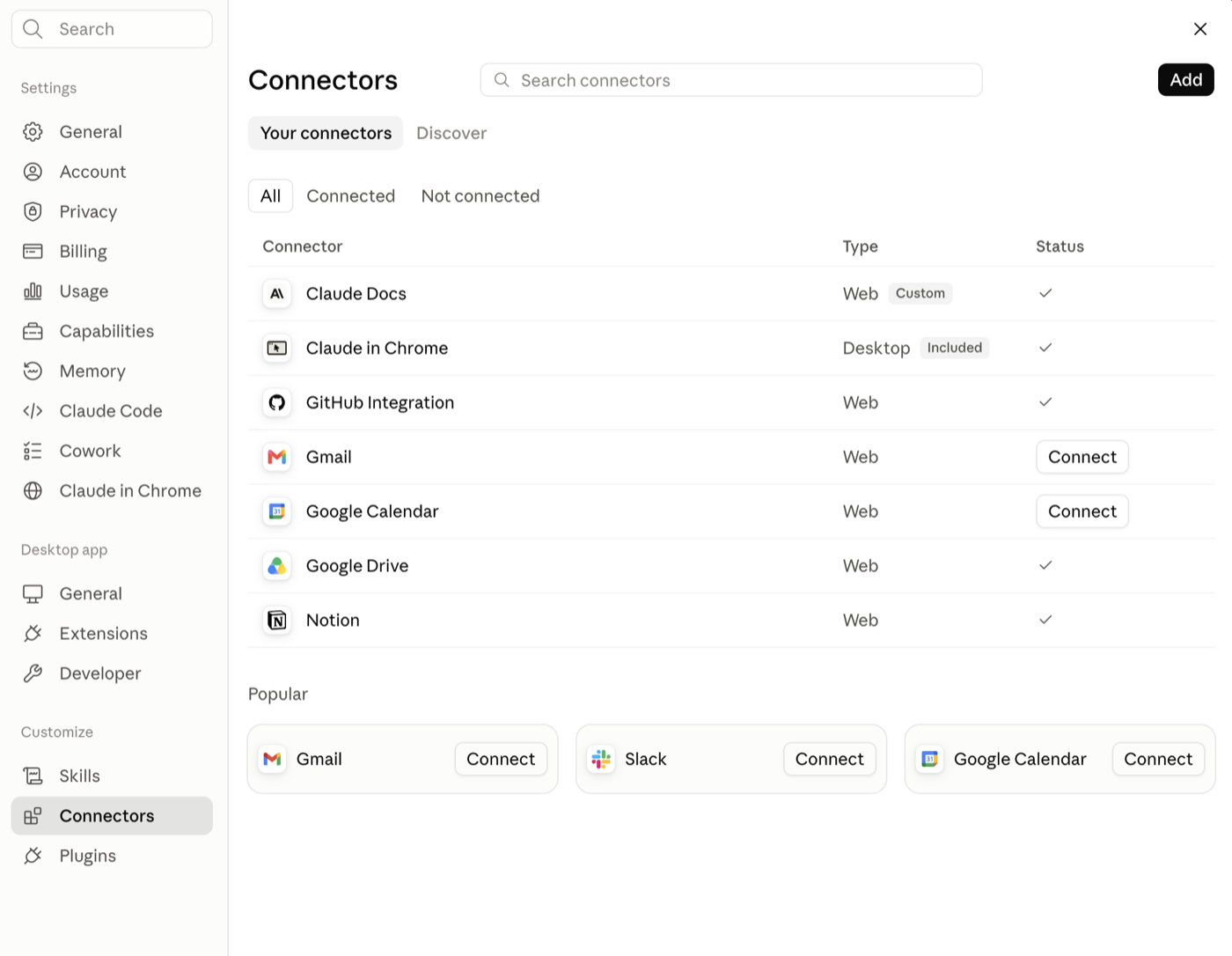
1. Open Settings → Connectors and click Add (top right).
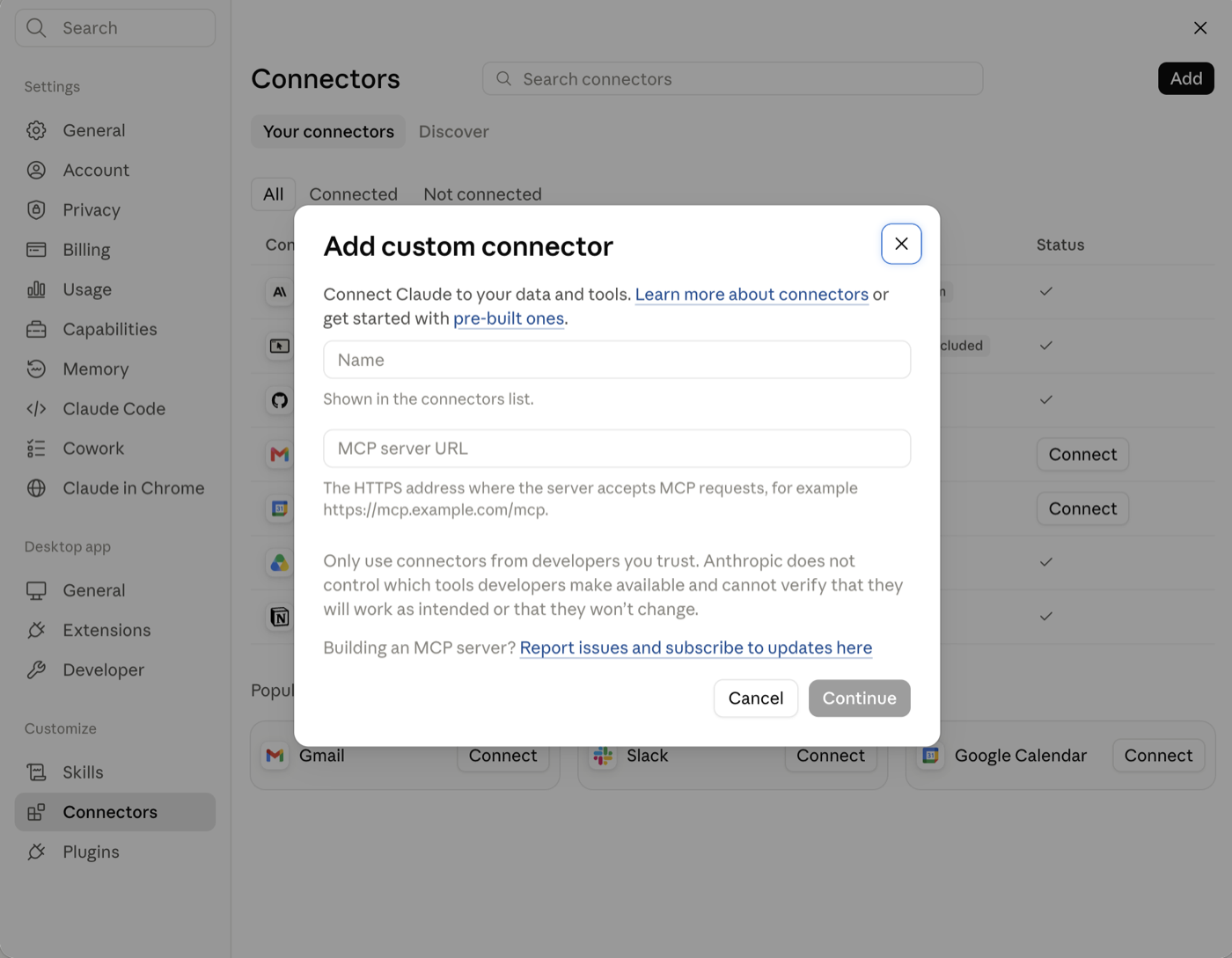
2. The "Add custom connector" window opens.
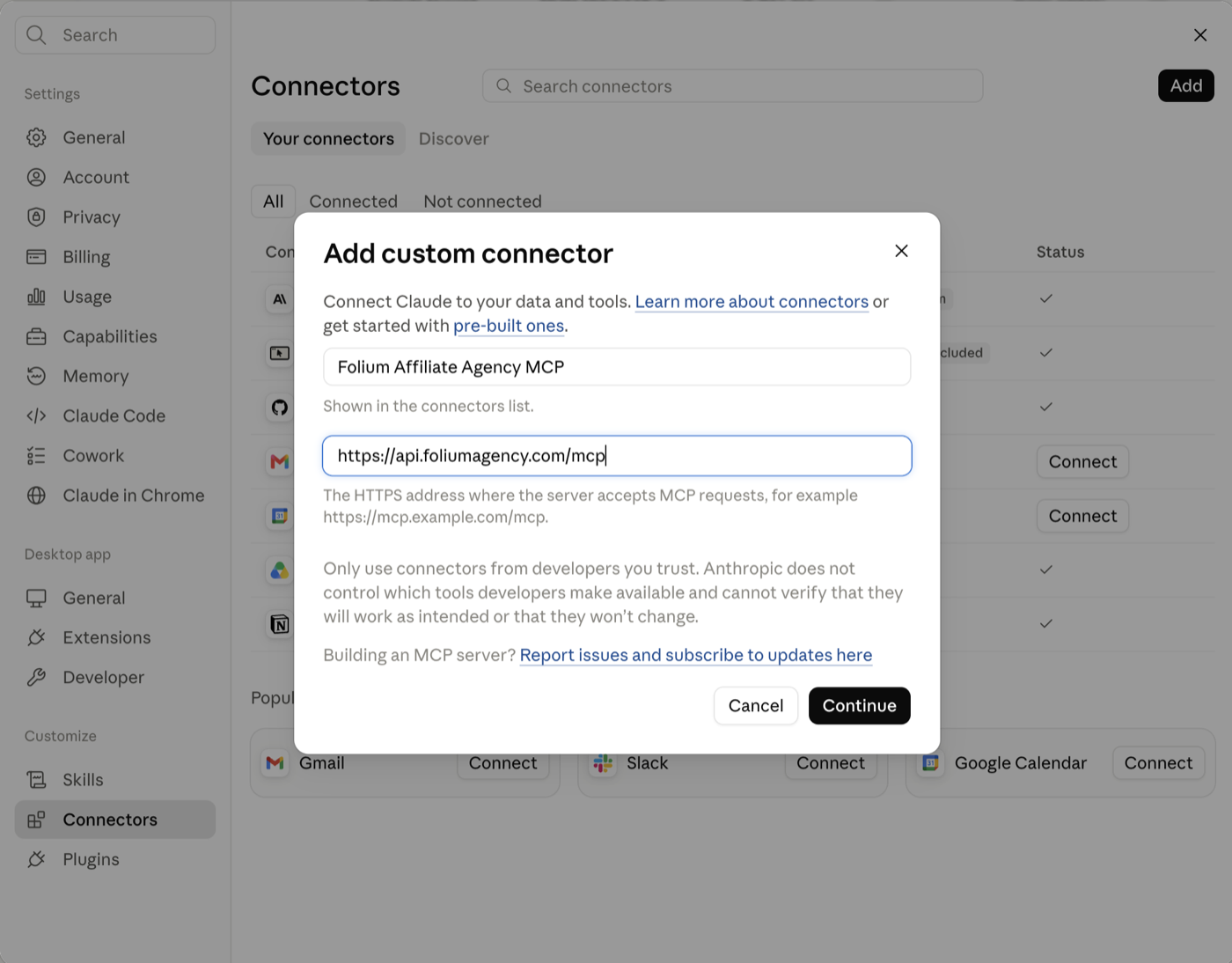
3. Fill in the two fields and click Continue.
- Name:
Folium Affiliate Agency MCP(any name works — this is what you'll see in your connector list) - MCP server URL:
https://api.foliumagency.com/mcp
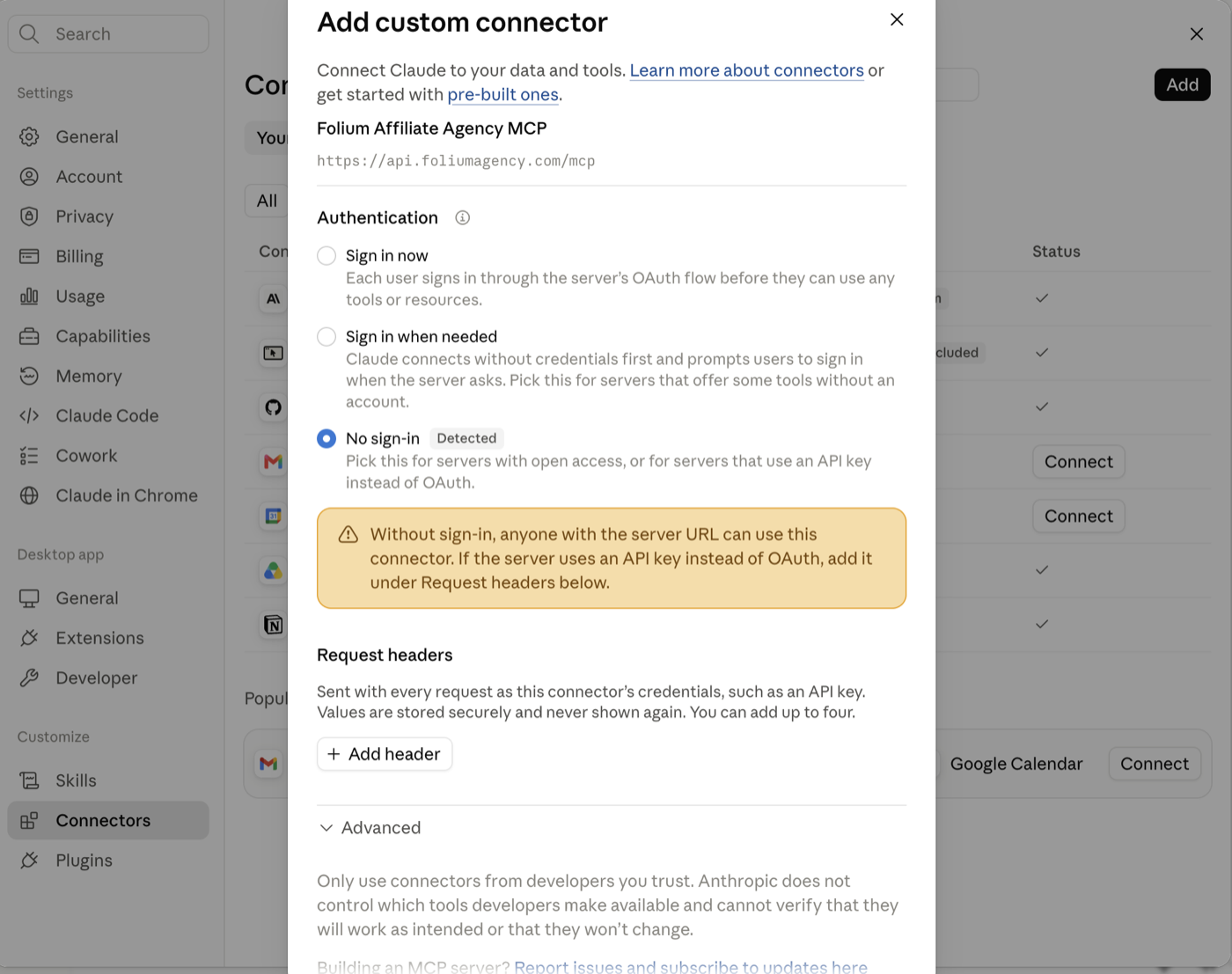
4. Under Authentication, leave "No sign-in" selected, then click + Add header.
Claude shows a yellow warning about open access — that is expected. Your API key, added in the next step, is what protects your data.
5. Add the header that carries your key, then click Add.
- Header name:
authorization - Value:
Bearer YOUR_FOLIUM_API_KEY— the wordBearer, one space, then your key - Leave Required ticked
Claude hides the value and never shows it again.
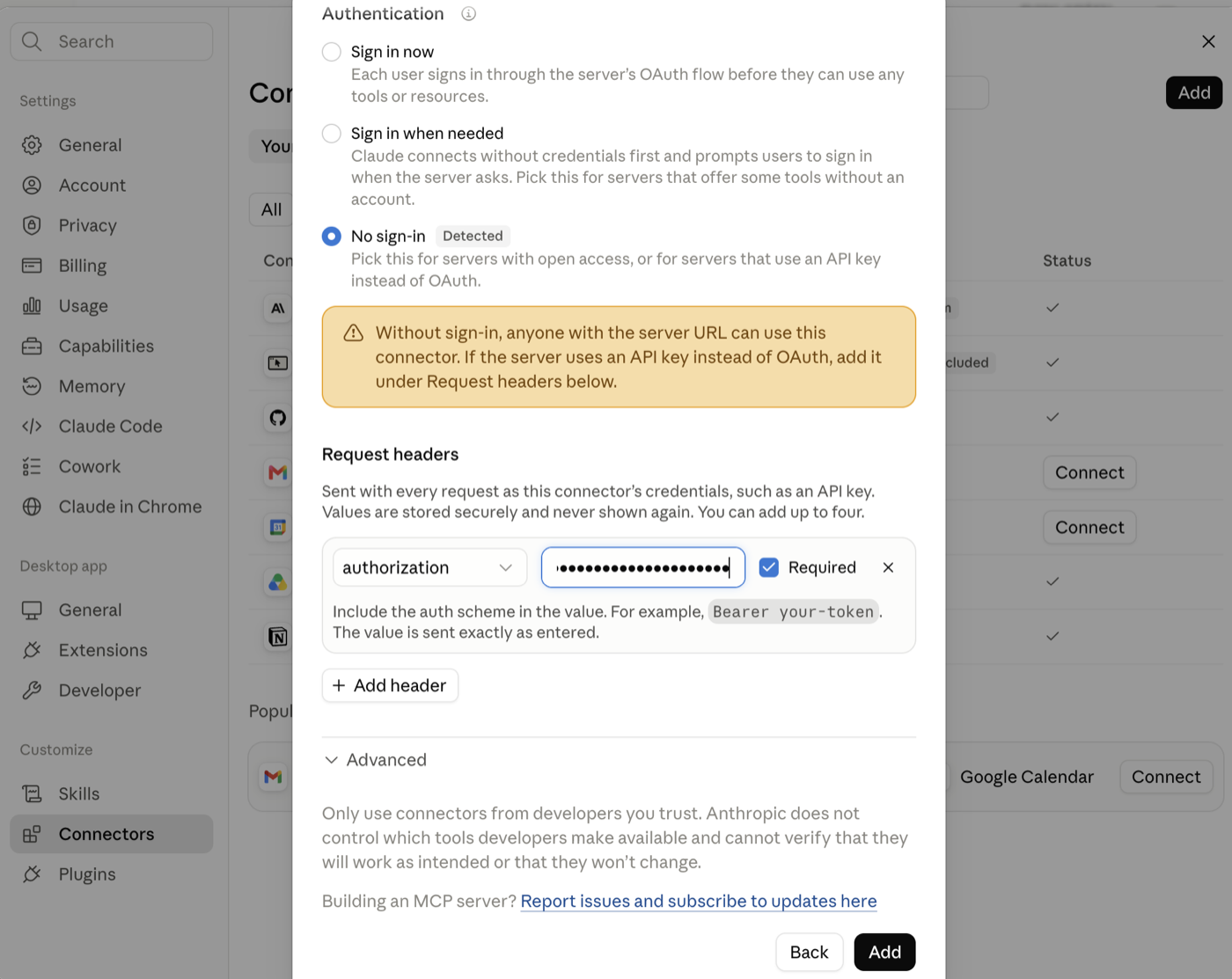
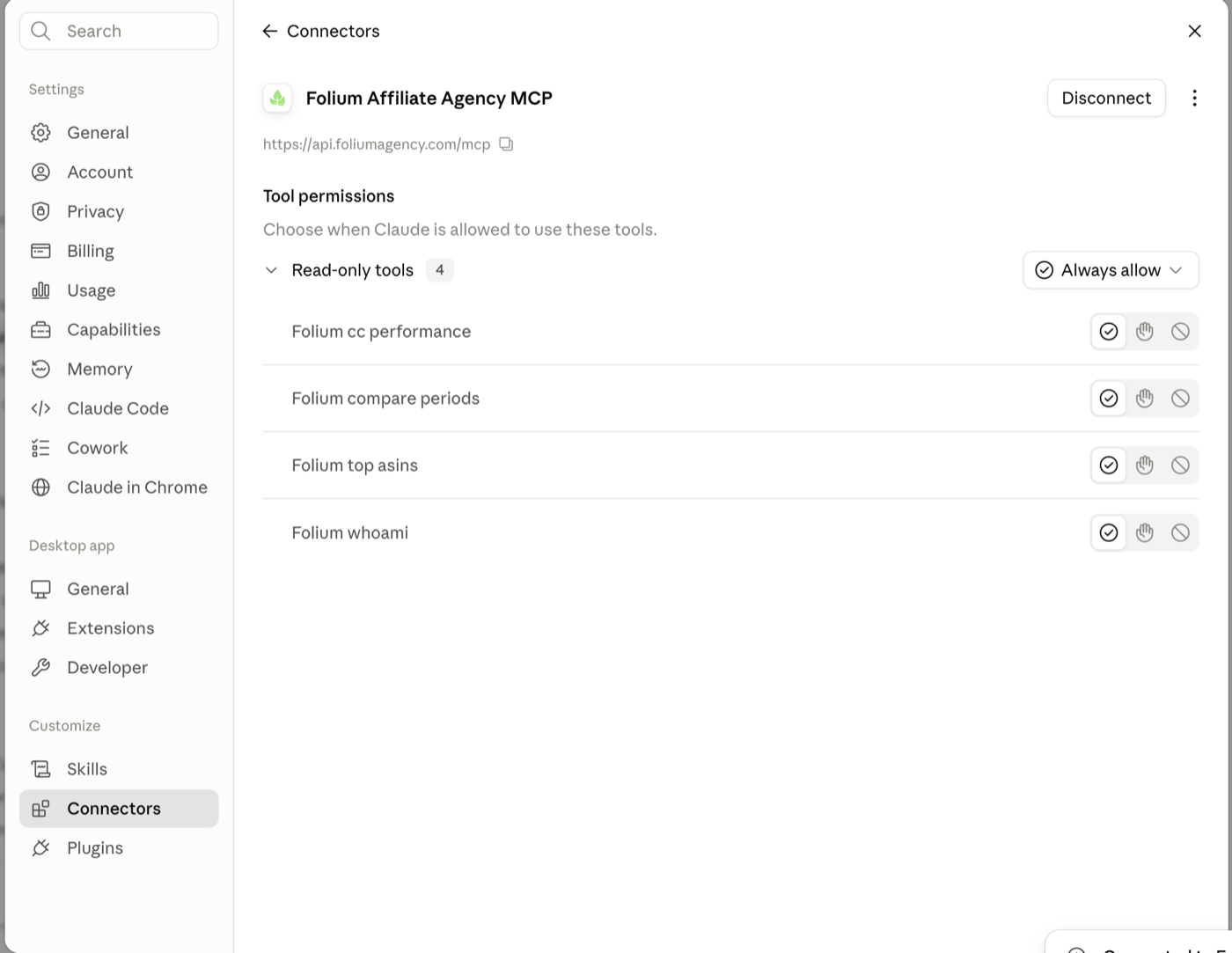
6. Done. The connector page lists four read-only tools. Leave them on Always allow so Claude doesn't ask for permission on every question.
7. Ask a question. Start a new chat, click +, open Connectors, turn the Folium connector on and ask: "What brands can you see and how fresh is the data?"
If your Claude plan shows only Sign in now with no header option, choose it, click Add, then Connect, and paste your key on the Folium page that opens.
On Team and Enterprise plans an owner adds the connector once under Organization settings → Connectors; members then use it with the same key.
What you can ask
- Which brands are included and how fresh the data is
- Sales, orders, spend and clicks for any date range, in total and per brand, per day, or per product per day
- Top products by sales, orders or spend (up to 31 days)
- One period compared with another — previous period, same days last month, same dates last year, or any two ranges
Notes
- Same data rules as the API: US marketplace, USD, Amazon US reporting days;
spendis creator commission; clicks are approximate. - Every answer states the latest day the data covers.
- Attribution data is not included yet.
- Beta: if something is unclear or missing, email contact@foliumagency.com.